R / 01
Single page
Use Cmd-Shift-1 for page-at-a-time reading.
Independent software / Release 004
Zys Reader 0.3.9 · Zotero
Zys Reader adds page-at-a-time and two-page spread reading to Zotero’s PDF reader, with fit-to-window sizing and a focus mode for an uncluttered reading space.
Requires Zotero 9 on macOS
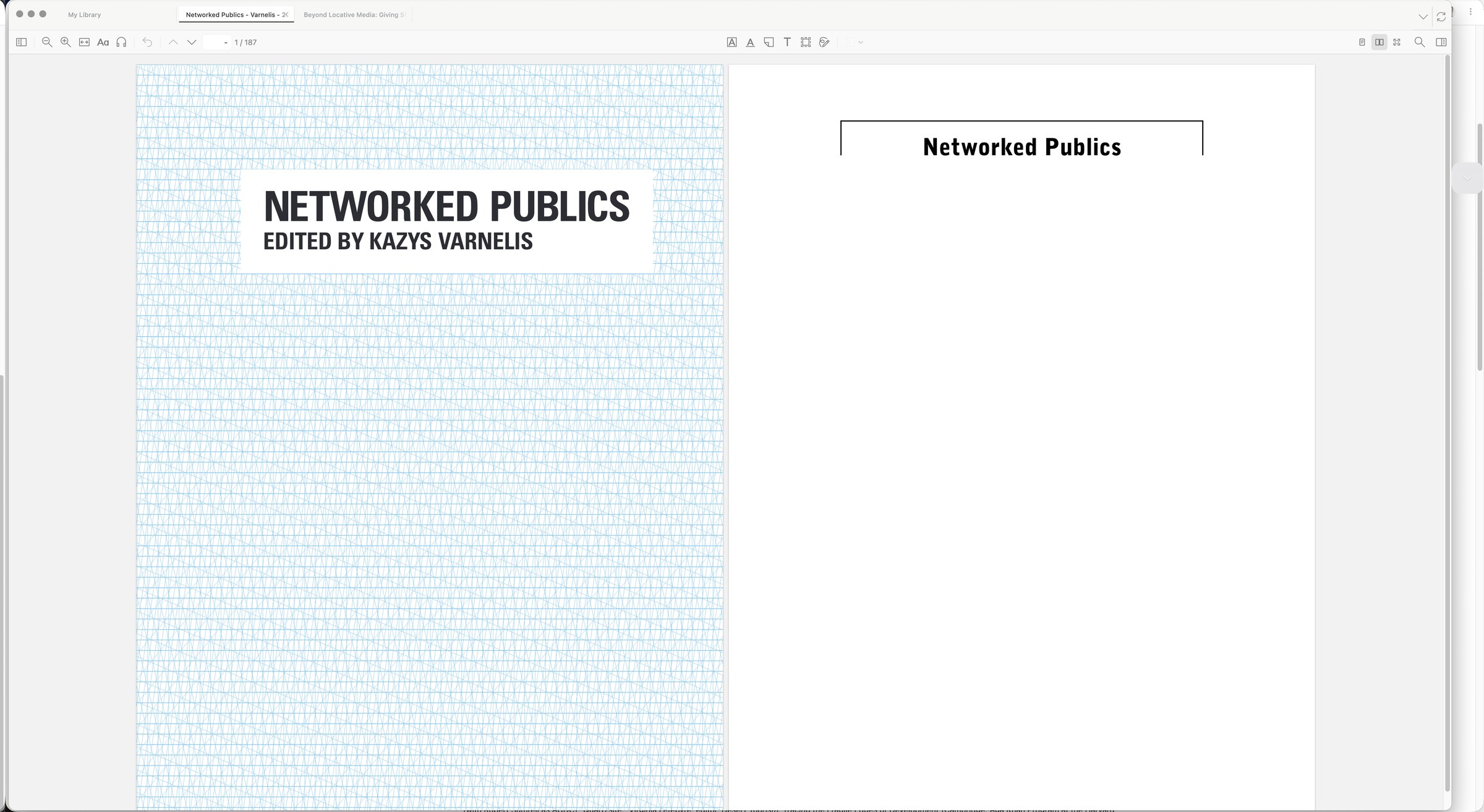
Move through a PDF as discrete pages or facing-page spreads. Zys Reader keeps the page fitted to the window and lets the interface fall away when it is time to focus.
R / 01
Use Cmd-Shift-1 for page-at-a-time reading.
R / 02
Use Cmd-Shift-2 for facing pages, or Cmd-Shift-0 to return to normal scrolling.
R / 03
Use Cmd-Option-F to hide distractions and keep the document in view.
Save zys-reader.xpi to your Mac.
In Zotero, choose Tools → Plugins, then select the gear menu.
Choose Install Plugin From File…, select zys-reader.xpi, and confirm.
| Version | 0.3.9 |
|---|---|
| System | Zotero 9 on macOS |
| Format | XPI add-on |
| SHA-256 | 1b534c25c21ef43d328e0a3331614eca37e3c32948ad303bc959445959ea249a |
This page uses no analytics, cookies, or third-party resources.