P / 01
Counts prose, not source
Each contiguous block of non-blank lines gets one number, placed on its first line. Continuation lines stay blank.
Independent software / Release 006
Paragraph Numbers 1.0.0 · Obsidian
Obsidian counts source lines, which tells you almost nothing about a long piece of prose. Paragraph Numbers puts a running paragraph count in the editor gutter instead, so a draft has reference points you can actually use.
Obsidian 1.0 or later · Desktop and mobile · MIT licensed
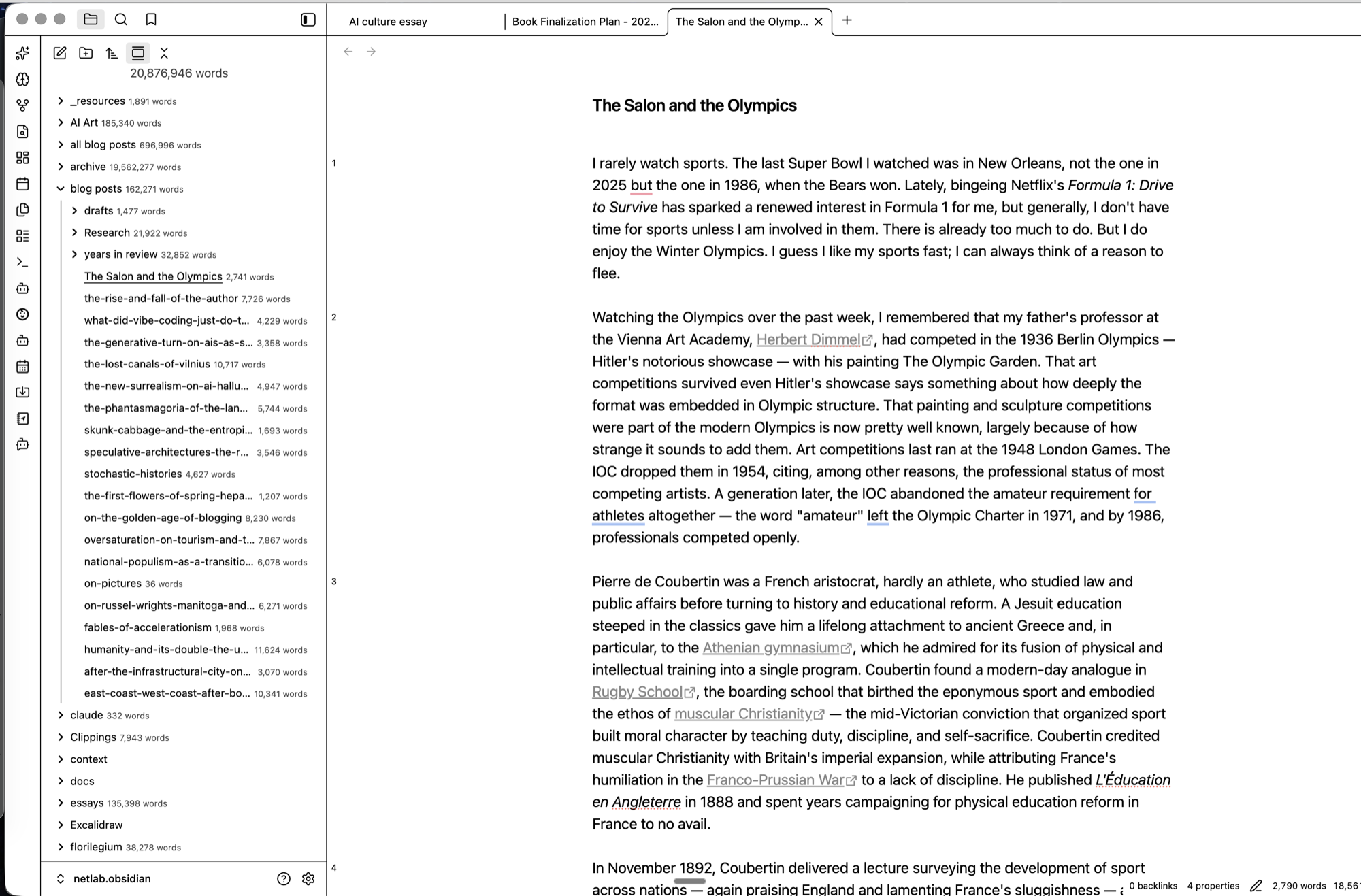
A paragraph is any unbroken run of content lines. The plugin numbers each one where it begins and leaves the rest of the block empty, so the margin gives you a count of the argument rather than a count of the file.
P / 01
Each contiguous block of non-blank lines gets one number, placed on its first line. Continuation lines stay blank.
P / 02
Frontmatter, headings, code fences, horizontal rules, and blank lines are passed over and never take a number.
P / 03
Turn off Obsidian’s built-in line numbers and hide the properties panel for the least cluttered writing view.
Find BRAT in Obsidian’s community plugin directory and enable it.
In BRAT, choose Add Beta Plugin and enter kvarnelis/obsidian-paragraph-numbers.
Enable Paragraph Numbers under Community Plugins, then switch off Settings → Editor → Line numbers, which now duplicates it.
For a manual install, download main.js, manifest.json, and styles.css from the latest release and place them in <your vault>/.obsidian/plugins/paragraph-numbers/.
| Version | 1.0.0 |
|---|---|
| System | Obsidian 1.0+ · desktop and mobile |
| Status | Installed through BRAT, not the community directory |
| Built with | CodeMirror 6 gutter API · no build step |
| License | MIT |
| Source | github.com/kvarnelis/obsidian-paragraph-numbers |
Paragraph Numbers draws in the editor gutter and never alters the text of a note. It sends nothing anywhere. This page uses no analytics, cookies, or third-party resources.